
Art Submission Guidelines
Preparing your files correctly is the key to a flawless final product. Use these guidelines to make sure your artwork is print-ready, color-accurate, and optimized for our production process.
Preferred File Format
Our preferred file format is a press-quality PDF at 100% size, including bleeds.
We also support:
- Adobe Illustrator (.ai, .eps, .pdf)
- InDesign (.indd, .idml, .pdf)
- Photoshop (.psd, .psb, .jpg, .tif, .raw, .eps, .pdf)
Please contact your SuperGraphics representative for very large file deliveries.
general file preparation guidelines
- Build art in 1:1 full scale when possible or 1:10th scale for very large graphics.
- Ensure your files include 0.25″- 1.5″ inches of perimeter bleed (i.e. additional art extending beyond the finished print size). The larger the final graphic, the more bleed may be required. A large wall mural, for example, will need 1-1.5″ bleed.
- Files should be supplied in CMYK, including both the links and the layout program.
- Please indicate any specific Pantone (PMS) colors needed for color matching.
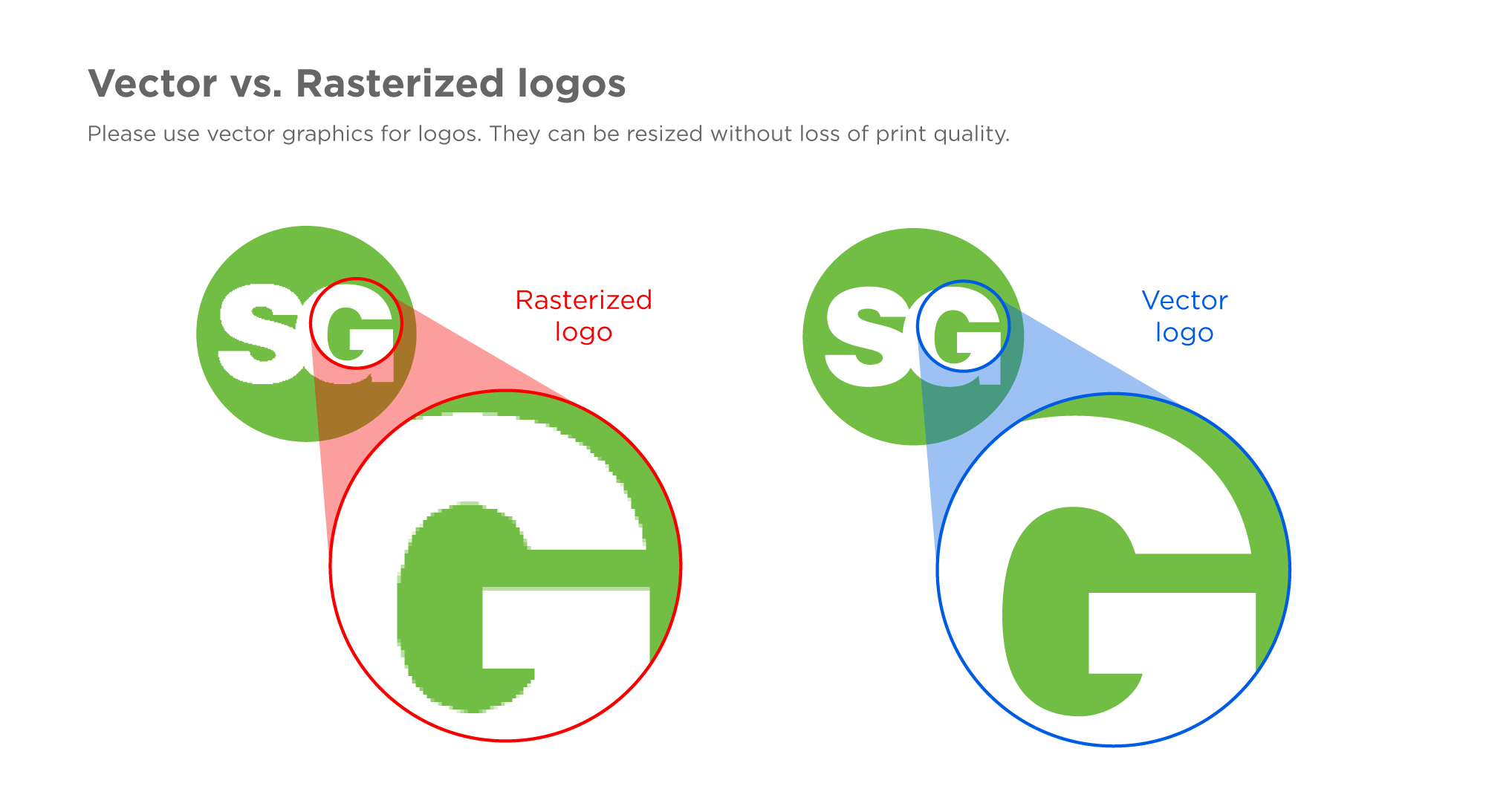
- All Logos should be supplied as vector outlines (see Figure below) or at highest available resolution (raster).
- Convert all text to outlines (curves or paths) where possible or include copies of all fonts used in the artwork.
- All Images used in the graphic layout should be linked (not embedded) and provided in an “Assets” folder. InDesign and Illustrator will do this via the “Package” option.
- Avoid image adjustments in a layout program. In-program image effects often print differently than they appear on screen.
- All black should be built as Rich Black (C:30, M:20, Y:20, K:100) to ensure deep, solid, rich reproduction.
- Single color (grayscale) blacks will not have the same density that Rich Black will provide.
- Avoid the use of “Registration” black, “Paper” white and Overprint transparency fills. These are offset printing options that do not reproduce well in digital printing environments.
Resolution Suggestions:
- Please note, the quality of the original photo is as important as the pixels per inch (ppi).
- The recommended image resolution is dependent mostly on viewing distance. Higher image resolutions are better for close viewing distances.
- Here are suggested minimum image resolutions when designing large-format graphics at 1:1 scale:
- Small format: At least 300 ppi
- Viewing up close (viewing at 3-10 feet distance): At least 100-150 ppi
- Mid-range (viewing at 10-25 feet distance): At least 50-100 ppi
- Far away (viewing at 25 feet away or more): At least 25-50 ppi
- Here are suggested minimum image resolutions when designing large-format graphics at 1:10 scale:
- Small format: At least 3000 ppi
- Viewing up close (viewing at 2-10 feet distance): At least 1000-1500 ppi
- Mid-range (viewing at 10-25 feet distance): At least 500-1000 ppi
- Far away (viewing at 25 feet away or more): At least 250-500 ppi
Need a Downloadable Version?
Download a copy of our Art Submission Guidelines (PDF) for quick reference or easy sharing.